No network, no service. Every customer service talks to the Internet, and often to the customer's other services. This page explains how traffic reaches the Internet, what happens when links fill up, and how to survive a broken cable.
¶ 🔗 The chain to the Internet

Only a router can bring up the link with the operator uplink. A switch plugged straight into the uplink stays down.
When a service can't reach its destinations, it is disconnected: it earns nothing and counts as an outage for the customer. When its traffic is too slow or loses packets, it is degraded: still paid, but still an outage in the customer's eyes. See SLA and Reputation.
¶ 🧩 Who does what
| Device | Behaviour |
|---|---|
| 🔀 L2 switch (simple switches) | Uses only one path. Backup links between switches stay on standby and only take over after a short outage. |
| 🔀 L3 switch (network core) | Spreads traffic over several paths and fails over instantly. |
| 📡 Router | Multipath like the L3 switch — and the only device that connects to the operator. |
| 🖥️ 2U and storage servers | Two network ports in active / standby: plug each into a different switch. |
¶ 🎛️ Traffic distribution
When a device has several links leading to the same place, its management page lets you choose how its outgoing traffic is shared:
| Mode | Behaviour |
|---|---|
| Automatic | The default behaviour of the device type (table above). |
| Load balancing | All links are used, in proportion to their free capacity. |
| Failover | Everything goes through a primary port; the next one only takes over if it is cut or saturated. |
| Manual | You set each port's share yourself. |
Load balancing doubles the useful bandwidth of a server connected to two switches — but then its traffic depends on both. Keep failover if you want a backup link that stays free.
¶ 🌍 Your Internet subscription
The operator uplink starts on a basic 1 Gb/s offer. Faster offers (10, 40 and 100 Gb/s) are unlocked through Research and Development and chosen from the operator uplink's management page.
- 📦 The box follows the offer: the operator swaps the uplink box for one matching your plan. The basic box has copper ports; faster boxes only have SFP / QSFP cages. When you switch, cables plugged into ports the new box doesn't have are unplugged (you're warned first).
- 🧾 Billed daily, at midnight: a daily fee for the plan, plus the volume of data exchanged with the Internet.
- 🐢 Faster plans also come with lower latency.
¶ 🚦 Saturation and latency
Every link has a capacity in each direction. As it fills up, things get worse — slowly at first, then very fast:
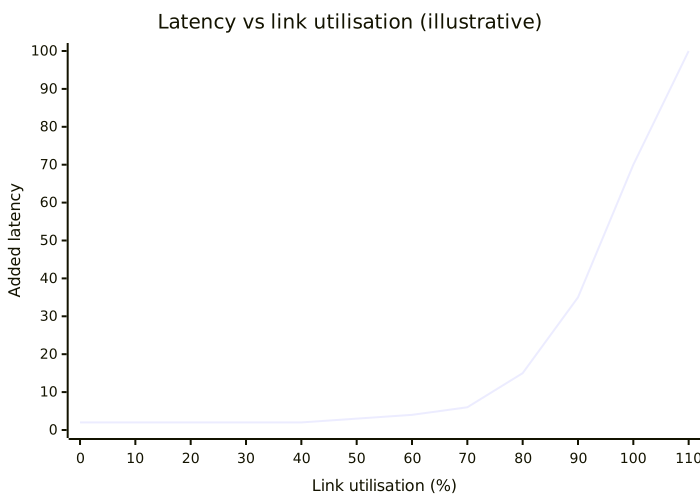
- Up to about 70 % utilisation, all is fine.
- Above that, latency climbs.
- Above 100 %, the link drops traffic.
Each type of service has its own latency budget: a database is far more demanding than object storage. When the budget is exceeded, the service is degraded.
The Network page colours links by load (green, orange, red) and lists saturated links.
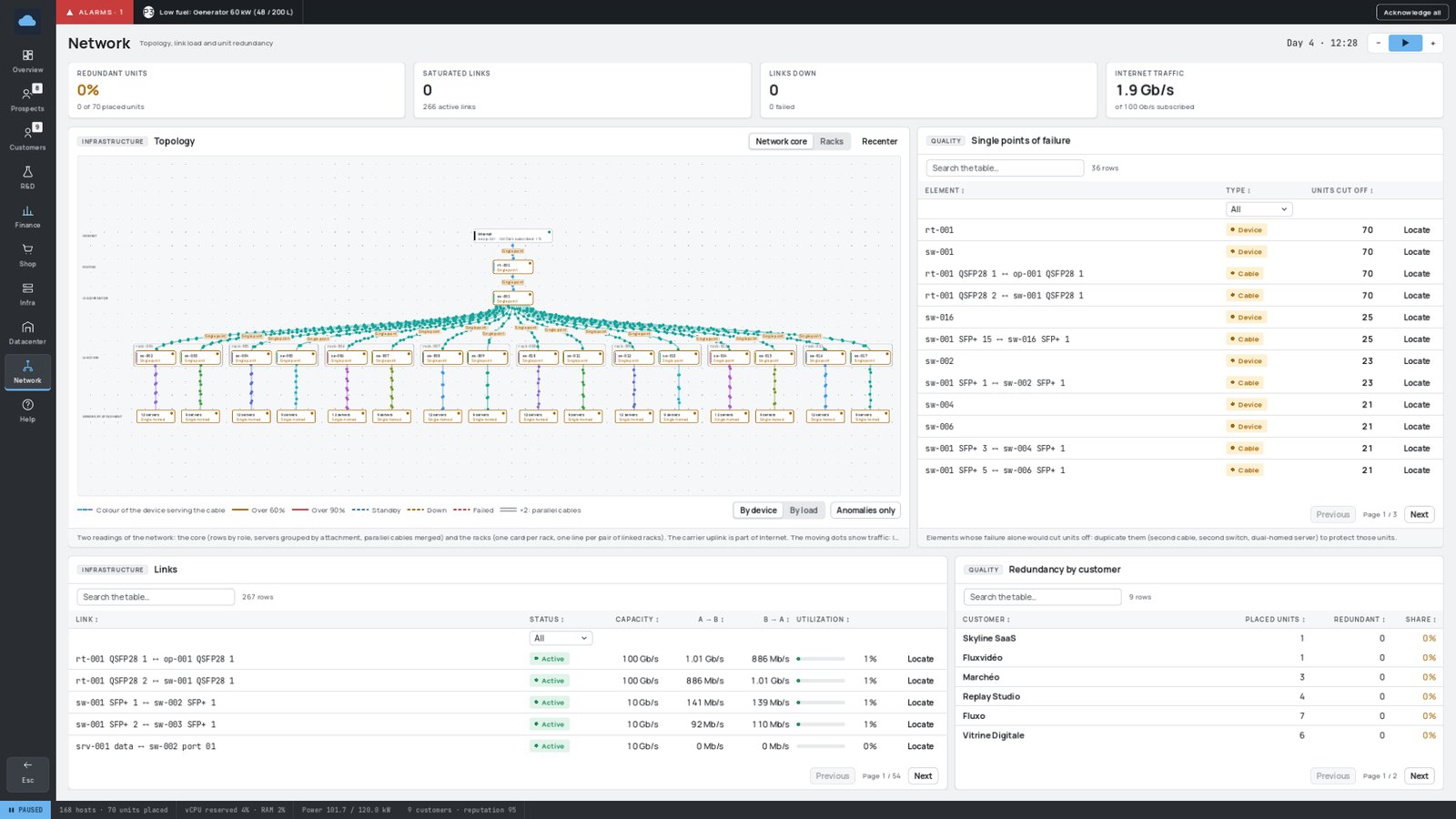
As soon as links regularly exceed 70 %, add links or move to faster switches. Upgrade your Internet plan before the operator link saturates.
¶ 🛡️ Redundancy
A single point of failure is a device or a cable whose failure alone would cut services off. The Network page lists them, most critical first, and shows how many of each customer's services are protected.
How to get rid of them:
- Double the cables between switches.
- Add a second switch, and plug two-port servers into both.
- Use L3 equipment so that failover is instant.
- Double your router (the Internet access stays a single point until you do).

A server with a single data port can never be connected to two switches: its cable stays a single point of failure as long as customers live on it. Move them to a two-port server.
The operator uplink itself never fails — but its cables and ports can.
Demanding customers (Business, Enterprise) justify the investment: a single badly placed failure can push them below their SLA target.